Quarter - my time-tracker. Rewritten. Again.
I have been busy rewriting the UI for Quarter in yet another language. I am quite happy with the new look and feel, see for yourself and why not try it out!
I have this hobby project of mine that I use daily to track my working time. This project has been my go-to project to try out new things for more than 10 years1, and I just completed replacing the application user interface with a web client written in a language called Gleam. I have had a lot of fun doing this and am quite happy with the new looks.
Before we take a walk down memory lane, let me showcase the reworked user interface and tell you what makes Quarter special.
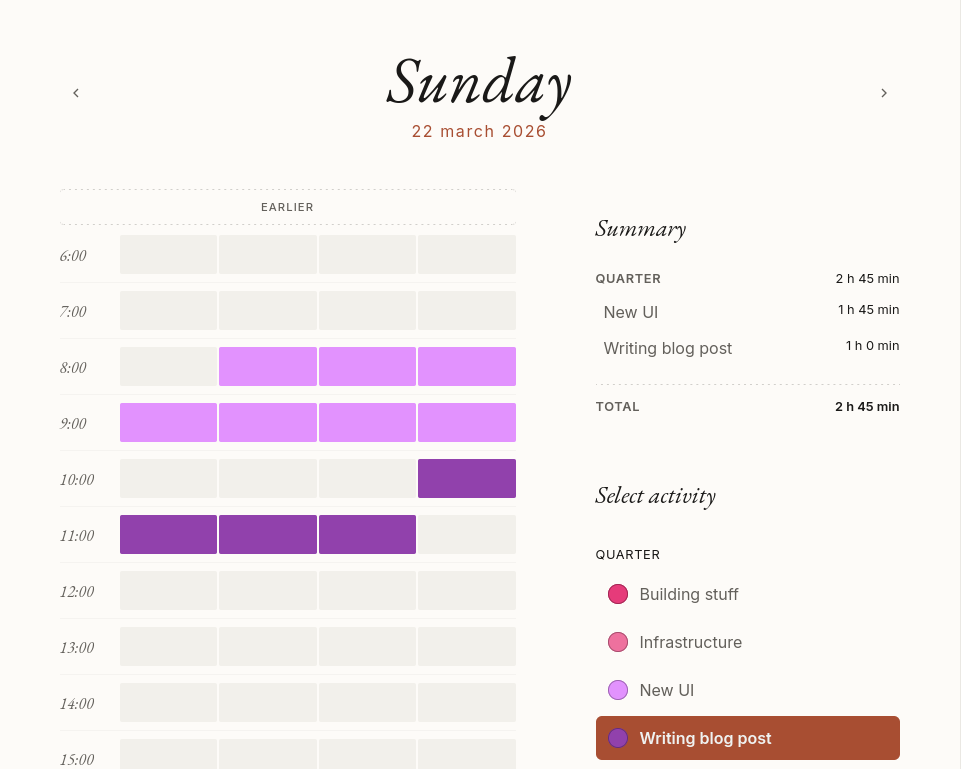
What, no massive matrix of cells where you are expected to write the time spent on a project in a decimal form?
No. Quarter takes another approach: to register time, you paint your activity across the quarters of a day2. It is made to be as simple as possible to register time (at least to the quarter).
It gives you a visual overview of a single day, what you spent your time on separated by colours of your choice — along with a short summary.Fifteen minutes
I have been working as a consultant for a long time. During those years I have used more time-reporting tools than I can remember3. In some projects I have been required to register time at my employer as well as at my client.
These tools are generally not made to assist you in registering time. They are designed to extract spent time for invoices. There is nothing wrong with that, but I am not an accountant. I wanted a tool that helped me accurately remember how much time I spent on what project so that I could enter this into the time-reporting tools required.
One thing common across all my assignments is that no one ever required higher granularity than a quarter of an hour.
Hence, Quarter4 was born.
The way I use it
I use Quarter as my main source for registering time. I keep a browser tab open all day and track time when I remember. It is always done retroactively but close to when the work takes place so that I can make a fair registration. There is no timer, and this is how I like it. Timers do not fit my way of working. I rather open my tab a few times a day and paint what I did.
When the week is over, I open the report view and then transcribe the work into the various time-reporting tools. Here it is all about cells and decimal values. It often maps quite well to the target systems, as they are all glorified spreadsheets.
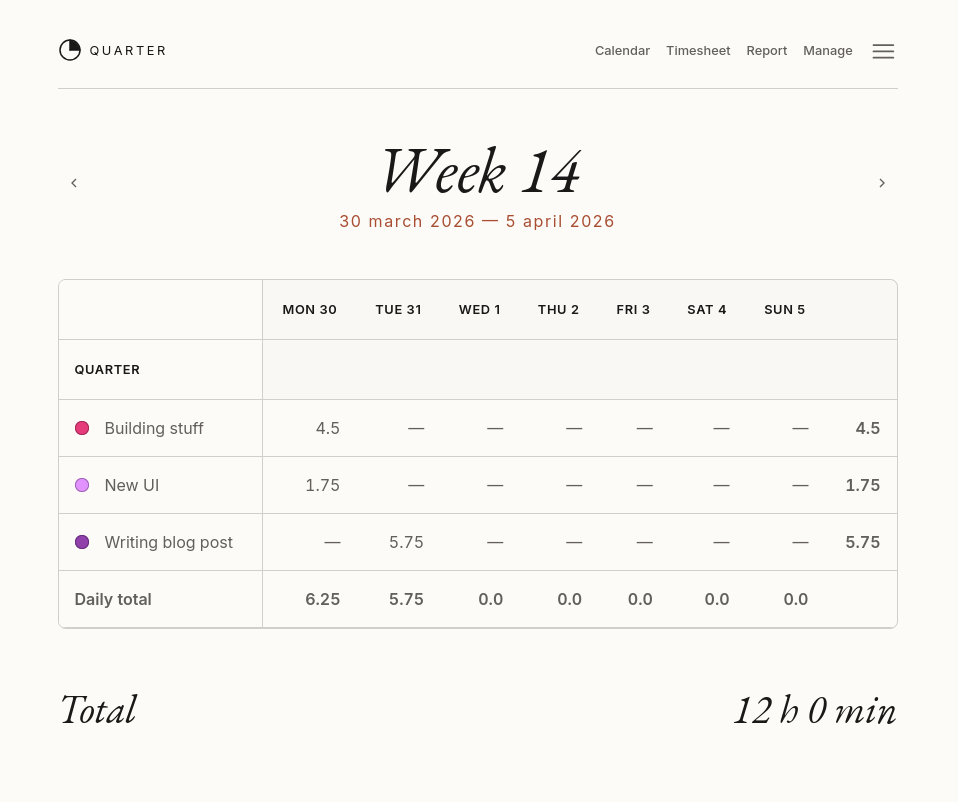
Features
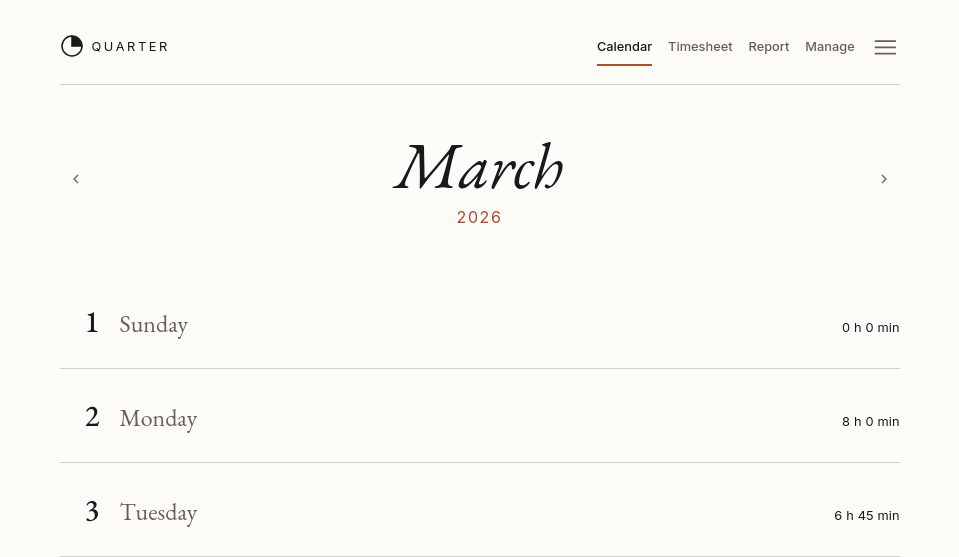
There are two more views in the application: a calendar view that shows you the current month and lets you navigate to a specific timesheet.
And there is a way to manage projects and activities as well.
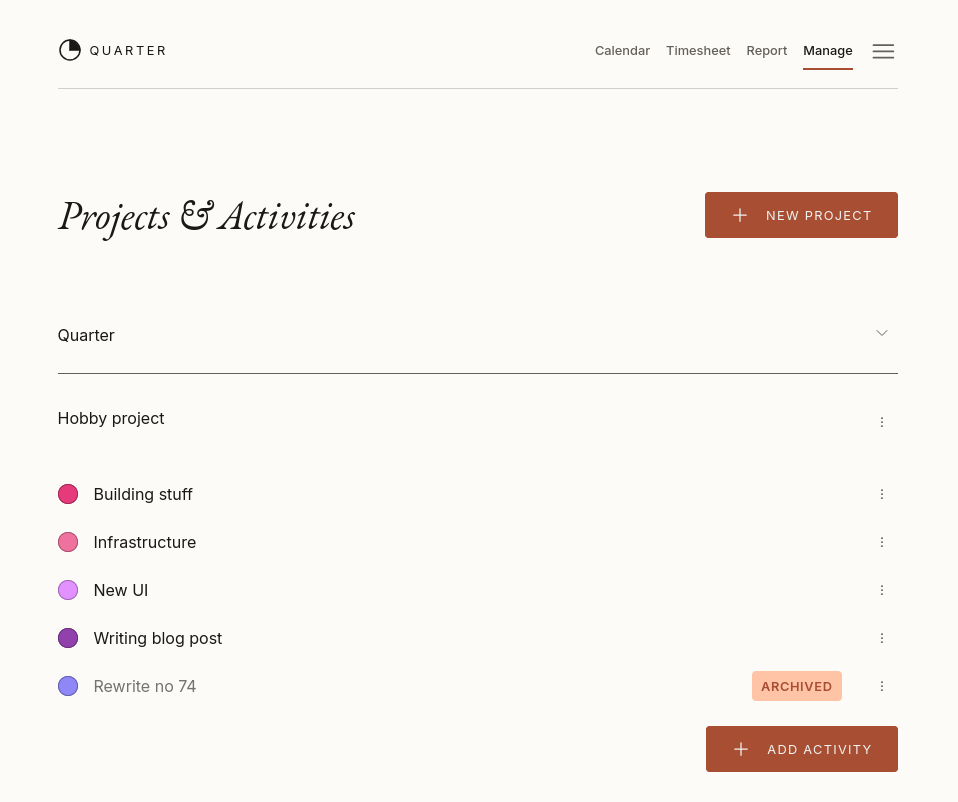
A project contains a number of activities where each activity has a name, description, and colour. These are used in the timesheet activity list and in the report.
Archived activities are included in the report and visible on the timesheet grid, but not available for new time registrations. The same applies to archived projects.
Paperlike
The user interface here is brand new. I wanted something that looked elegant and like a paper calendar. I am quite happy with the aesthetics so far. But I rushed it in the end to get it out there, so there are a few things I want to add and polish — the features are pretty much set, however.
Here are the features you can expect today:
- Login using GitHub or Google.
- Manage projects and activities.
- Archive projects and activities.
- Register time.
- Monthly overview with total time per day.
- Weekly usage report.
- Light and dark themes.
- Mobile friendly5
And here are the upcoming features I have in mind:
- Show the main two or three activities per day in the calendar to help give an overview of what you did that day.
- Make it easier to see the number of hours for the current week.
- Replacing Google and GitHub login with a password-less / magic link login.
Memory lane
As I said earlier, I have been working on this project for ten years. What on earth have I been doing all this time if these are the only features, you might ask.
Well, like any good engineer, I spend a lot of time rewriting it in shiny new languages and frameworks. I don't know which rewrite this is actually — I have done quite a few, and there are even more in my box of broken dreams 6.
Here is a summary of the major initiatives through the years.
The first version was made in Clojure around 2012 or 2013, running on Google App Engine. This was my first encounter with LISP and functional programming in general. Clojure does hold a special place in my heart since then. I would like to revisit it, but I am afraid that the dynamic typing would ruin my fond memory.
Shortly after that I rewrote it in Python, using Tornado as the web framework. Nothing special really.
Then I got thrown into a project that used Django and thought that it would be good to rewrite it in Django, so I did. This version ran for many years — super stable — and I have never been as productive in any other framework! Django is a fantastic piece of software: rock-solid, well-designed, and very approachable when reading through the source code.
Server-side rendering was fun, but all the kids were doing AngularJS, so I made an 80% finished version using Django Rest Framework with an AngularJS UI on top. It never saw the light of day, but it was fun to hack on.
Before my node_modules could cool down I substituted AngularJS with Vue (I cannot remember if
it was version 1 or 2). It was basically the same thing as AngularJS and I got bored.
Tired of the front-end fatigue, I switched focus to replacing the Django backend with Scala, keeping the almost-finished Vue client. This was using Scala 2 and Akka — I really enjoyed working with this stack. Unfortunately, I never took it to production; I think the report part was missing before I got distracted.
Scala was lovely, but I jumped the fence into C#7 land, mainly due to a project at work where we used .NET and Blazor Server as the UI technology. Blazor surprised me — it had quite good performance, and it was a joy not having to write the HTTP transport using JSON. The Blazor version ran for a few years actually, and that was when I decided to make Quarter open source!
About half a year ago I decided I wanted to try out Gleam, and especially Lustre, the front-end framework that is heavily inspired by Elm. So, to no one's surprise, I went to work and implemented the client in Gleam and added an HTTP API to the existing C# backend. This is where we are today.
Right now I feel pretty done with rewrites for a while, so hopefully this will be the third version to run for a few years. Or maybe the backend should be migrated to something new? 🤔
Try it out!
Quarter is running on my small VPS, and actually, I am not the only one using it. There are a few long-time users that have been with me throughout the rewrites. So I guess Quarter fills some need, at least among consultants8.
As I run this service for myself, I said that as long as there is free capacity on the server, anyone is free to register and start using it. When the capacity runs low, I will stop accepting new users, and they will have to host it themselves.
I have a few things to tidy up in the implementation and to write a document on architecture and design to help anyone who would like to contribute. That will hopefully be my next post here.
As always, I really appreciate when a reader or Quarter user reaches out, so don't be a stranger!
Enough talking, go check it out quarterapp.com
This will be sent straight to me. There is no validation, no captcha, no tracking, no reply address - so please be kind ♥️