Type-safe i18n in Gleam
I wanted to add translations to a small Gleam project I am working on. The type-safety and pattern matching in Gleam helped me make a solution that I am pretty happy with.
I am working on a small web application in Gleam that I want to prepare with translations. The application itself is a small social network1 centered around the art of album listening and discussing music between friends.
The primary language will be Swedish since it feels pretentious to have an English interface when we discuss in Swedish. But I hope to open source the application if it turns out OK, so I want to have translations in place from the start.
My experience with translations in other projects has all been based on the premise that translation keys are strings that resolve to another string, the translated one. The strings are often namespaced to give some context to the translator as well as help managing translations.
For example, in Vue a translation is often done in the template such as $t('login.submit.button') }}, which would
resolve to the string "Log in". There is often support to pass in contextual parameters such as
$t('login.email.sent', { email: 'jane@example.com' }) }}, which would resolve to "Sent a login link to jane@example.com"
if the translation key was something along the lines of:
{
  "en": {
    "login": {
      "email": {
        "sent": "Sent a login link to {email}"
      }
    }
  }
}
I do not want to complain about JSON2 or JavaScript, I would probably have built my i18n solution along the same lines as the code above if I was using JavaScript.
Nonetheless, there are a few weak points here:- The translation keys are strings, what happens if we pass something that does not exist
login.something.unknown? - The string interpolation is fragile, what if we do not pass in a parameter, or pass in the wrong key, or the wrong type?
- The translations are just objects, what if the
sv(Swedish) object lacks some keys?
You have to use other tools such as automated test, linters, etc. to make sure you pass in the correct parameters. And yet another tool to make sure all languages have translations.
Fortunately enough, I am not writing my application in JavaScript3, I am using Gleam!
Gleam is a very nice statically typed language that gives us the building blocks we need to add translation support that makes it a lot harder to pass in the wrong parameters, and that also fails to compile should some language miss a translation.Show me the code
As I said, my application is small, and the journey is the goal, so I do not mind adding a homebrew i18n solution instead of using a third-party library.
Here is my version of how to use the i18n with Lustre:
import eliasson/i18n
import lustre/element/html

// Use the translation of the phrase "Check your inbox".
html.h1([], [i18n.label(i18n.English, i18n.CheckInbox)]

// Some translations, such as "Member" support pluralization.
html.p([], [i18n.label(i18n.Swedish, i18n.Member(i18n.Plural))])
The i18n.label function takes a language (which is declared as type variants) and the translation key and returns
a string.
Here are the basic parts of my i18n module:
import gleam/list
import gleam/string

pub type Language {
  English
  Swedish
}

pub type Cardinality {
  Singular
  Plural
}

pub type Inline {
  PlainText(String)
}

pub type I18NKey {
  /// Common word for member.
  Member(Cardinality)
  /// Heading shown after submitting the login form.
  CheckInbox
}

/// Translate `key` for `lang` and return a capitalised plain string.
/// Intended for labels, headings, and button text where capitalisation is expected.
pub fn label(lang: Language, key: I18NKey) -> String {
  translate(lang, key)
  |> to_string
  |> string.capitalise
}

fn translate(lang: Language, key: I18NKey) -> List(Inline) {
  case lang, key {
    English, Member(Singular) -> [PlainText("member")]
    English, Member(Plural) -> [PlainText("members")]
    Swedish, Member(Singular) -> [PlainText("medlem")]
    Swedish, Member(Plural) -> [PlainText("medlemmar")]

    English, CheckInbox -> [PlainText("check your inbox")]
    Swedish, CheckInbox -> [PlainText("kolla din inkorg")]
  }
}
Let's unpack what is going on.
- A translation is basically pattern matching on the combination of language, translation key, and cardinality if the key requires it.
- In the example above, all translations return a plain text string.
- The
labelfunction is a convenience function that capitalises the translation.
What is not visible, and that might not be obvious if you are not familiar with Gleam, is that:
- It is impossible to pass a language that is not declared in the
Languagetype. - It is impossible to pass a translation key that is not declared in the
I18NKeytype. - If the translation key requires a cardinality, you have to specify it as well.
And unless you add a wildcard4 match, such as _ -> [PlainText("missing")] or Spanish, _ -> [PlainText("No hablo español")])
the compiler will complain about any missing translation. And by complaint I mean that the compiler will not
compile the application.
Where is the magic?
There is not a lot of code, and zero magic in the code above. Still, it has none of the weaknesses we discussed earlier. It is not harder to use, it is easy to extend, and most of all, it is robust.
But we can do better, the string interpolation is not there yet!
Here is a screenshot of the application in Swedish5:
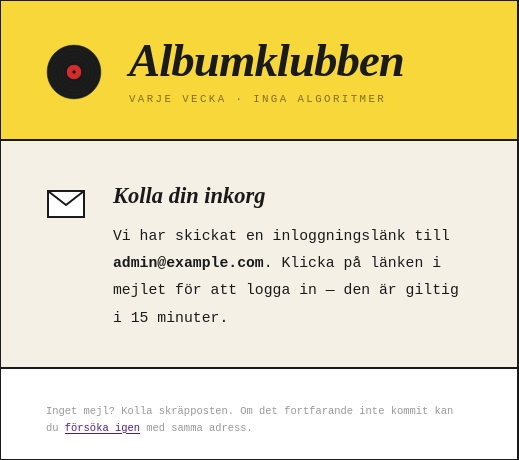
I wanted to add the ability to do string interpolation, but not only with strings. With rich objects, such as bold text, hyperlinks, etc.
- The email address used to send the login link is in bold.
- The footer of the card contains a hyperlink to the "try again" page.
So how can we solve this while keeping the guarantees?
I ♥️ types
The Inline type illustrated earlier was a bit of a simplification. It actually looks like this:
pub type Inline {
  PlainText(String)
  StrongText(String)
  HyperLink(href: String, text: String)
}
And the translation keys from the image above are:
pub type I18NKey {
  /// Heading shown after submitting the login form.
  CheckInbox
  /// Sentence confirming where the magic link was sent. Carries the recipient email address.
  MagicLinkSentTo(email: String)
  /// Fine-print asking the user to check spam. Carries the href for the retry link.
  NoEmailCheckSpam(link_href: String)
}
The view code using the translations is now:
let lang = i18n.Swedish
let user_email = "admin@example.com"
let login_url = "/login"

html.div([], [
  html.div([], [
    email_icon(),
    html.div([], [
      html.div([], [
        html.text(i18n.label(lang, i18n.CheckInbox)),
      ]),
      html.p(
        [],
        i18n.elements(
          lang,
          i18n.MagicLinkSentTo(user_email),
        ),
      ),
    ]),
  ]),
  html.p([],
    i18n.elements(lang, i18n.NoEmailCheckSpam(login_url)),
  ),
])
The first translation made, i18n.CheckInbox, uses the familiar label function. But the other two use a different
function, i18n.elements.
The elements function returns a list of Lustre elements, where each element is either a plain text string or
something else. In our case, the elements <strong> and <a>.
import gleam/list
import gleam/string
import lustre/attribute as att
import lustre/element
import lustre/element/html


/// Translate `key` for `lang` and return a list of Lustre elements.
/// Intended for keys that carry rich inline content.
pub fn elements(lang: Language, key: I18NKey) -> List(element.Element(a)) {
  translate(lang, key) |> to_elements
}

fn translate(lang: Language, key: I18NKey) -> List(Inline) {
  case lang, key {
    // The translation with a bold interpolated string.
    English, MagicLinkSentTo(email) -> [
        PlainText("we've sent a login link to "),
        StrongText(email),
        PlainText(". Click the link in the email to sign in — it's valid for 15 minutes."),
    ]
    Swedish, MagicLinkSentTo(email) -> [
        PlainText("Vi har skickat en inloggningslänk till "),
        StrongText(email),
        PlainText(". Klicka på länken i mejlet för att logga in — den är giltig i 15 minuter."),
    ]

    // The translation with the hyperlink.
    English, NoEmailCheckSpam(href) -> [
        PlainText("No email? check your spam. if it still hasn't arrived, you can "),
        HyperLink(href, "try again"),
        PlainText(" with the same address."),
    ]
    Swedish, NoEmailCheckSpam(href) -> [
        PlainText("Inget mejl? Kolla skräpposten. Om det fortfarande inte kommit kan du "),
        HyperLink(href, "försöka igen"),
        PlainText(" med samma adress."),
    ]
  }
}

/// Render a list of `Inline` nodes to Lustre elements.
fn to_elements(inlines: List(Inline)) -> List(element.Element(a)) {
  list.map(inlines, fn(inline) {
    case inline {
      PlainText(s) -> element.text(s)
      StrongText(s) -> html.strong([], [element.text(s)])
      HyperLink(href, text) -> html.a([att.href(href)], [element.text(text)])
    }
  })
}
The last function is where our richer types get translated to Lustre elements that can then be rendered to HTML.
By extending the translation keys with fields, such as MagicLinkSentTo(email: String) the translation can be
constructed with rich content separately from where it is used. We could even improve this further by using a custom
type for the email address instead of a string.
The only negative thing about this approach is that a single case for all the translations gets a bit long. Also, I
have all the translation keys defined in the i18n module. But for my application, this is manageable.
Overall, I am quite happy with how it turned out! Being able to provide decent translation support with strong guarantees is a huge win for me. Also, the more time I spend with Gleam, the more I like it. If you have not tried it out yet, you are missing out!
As always, I would love to hear your feedback!
This will be sent straight to me. There is no validation, no captcha, no tracking, no reply address - so please be kind ♥️